If you’re looking for the best 4K60 streaming capture cards, I recommend considering options like Elgato 4K S, which offers 4K60 HDR recording with near-zero latency, and AVerMedia’s 4K60 capture cards with HDMI 2.1 support for high-quality gameplay. Devices like the HD60 X also provide smooth streaming at 1080p60. Many of these are compatible with popular streaming software and consoles. Keep watching to discover which models fit your setup perfectly.
Key Takeaways
- High-end devices like AVerMedia 4K60 Capture Card and Elgato 4K S support 4K60 HDR10 recording with ultra-low latency for smooth streaming.
- Compatibility spans PlayStation 5, Xbox Series X/S, Switch 2, PC, and Mac, ensuring versatile content creation options.
- Features like HDMI 2.1, VRR, and 4K144Hz pass-through enable professional-quality gameplay with minimal lag.
- PCIe internal cards such as GC573 and GC575 offer high performance for internal setups demanding 4K60 HDR streaming.
- User-friendly plug-and-play design with software compatibility across OBS, Streamlabs, and other tools ensures seamless integration.
Elgato 4K S External Capture Card for Gaming and PC


If you’re serious about streaming or recording high-quality gameplay, the Elgato 4K S External Capture Card is an excellent choice. It delivers stunning 4K60 capture, capturing cinematic detail, vibrant colors, and high frame rates up to 1440p120 or 1080p240 for ultra-smooth footage. The support for HDR10 ensures brilliant HDR content with tone mapping on Windows. With near-zero latency via USB-C, your gameplay stays seamless. Compatible with PlayStation 5, Xbox Series X/S, Switch 2, PC, Mac, and iPad, it offers versatile use. Plus, the 4K60 passthrough and included audio input make it perfect for professional streaming and recording.
Best For: content creators, streamers, and gamers seeking high-quality 4K60 capture with versatile device compatibility and professional features.
Pros:
- Supports stunning 4K60 cinematic recording with vibrant colors and high detail
- Compatible with a wide range of devices including PlayStation 5, Xbox Series X/S, Switch 2, PC, Mac, and iPad
- Features near-zero latency via USB-C for seamless gameplay and streaming
Cons:
- May require a powerful PC or Mac to handle 4K60 recording and HDR10 processing effectively
- Higher cost compared to basic capture cards with lower resolutions
- Limited to 1440p120 or 1080p240 for high frame rate capture, not higher resolutions at those frame rates
AVerMedia Capture Card for Streaming, 4K60 HDR Passthrough and 1080p60 Recording

The AVerMedia Capture Card stands out as an ideal choice for gamers and streamers who demand high-quality visuals without sacrificing performance. It supports 4K60 HDR pass-through, letting you enjoy stunning gameplay on Switch 2, Xbox, or PS5 while recording at 1080p60 for smooth, professional-quality videos. The ultra-low latency pass-through guarantees near-instant response, making gameplay seamless and responsive. Its plug-and-play design works effortlessly with Windows 11, Mac, and popular streaming software like OBS, Camo Studio, and CameraFi. With flexible format support and broad device compatibility, this capture card offers a reliable, high-performance solution for both streaming and content creation.
Best For: streamers and gamers seeking high-quality, low-latency capture for gameplay on consoles like Switch 2, Xbox, and PS5, with easy setup and versatile streaming options.
Pros:
- Supports 4K60 HDR pass-through for stunning gameplay visuals on compatible devices
- Ultra-low latency pass-through ensures near-instant response for seamless gaming experience
- Compatible with Windows, Mac, and popular streaming software without requiring drivers
Cons:
- Limited to 1080p60 recording, which might not meet the needs of those requiring higher resolution recordings
- May require a powerful PC setup for optimal performance during streaming and recording
- No built-in hardware encoding, relying on software for streaming quality
Elgato HD60 X Game Capture Card

The Elgato HD60 X Game Capture Card stands out with its ability to deliver stunning 4K30 HDR10 capture alongside smooth 1080p60 HDR10 streaming, making it an ideal choice for gamers and streamers seeking high-quality visuals without sacrificing performance. It supports versatile gaming with 4K60 HDR10, 1440p120, 1080p120, and VRR passthrough, ensuring smooth gameplay across multiple devices like PS5, Xbox Series X/S, Nintendo Switch 2, PC, and Mac. Its driverless, plug-and-play setup simplifies installation, while ultra-low latency below 100ms guarantees seamless audio and video sync during live streams. Plus, there are no watermarks, time limits, or fees, providing unrestricted recording and streaming.
Best For: streamers and gamers seeking high-quality, versatile capture with easy setup and minimal latency across multiple gaming consoles and PC/Mac platforms.
Pros:
- Supports stunning 4K30 HDR10 and smooth 1080p60 HDR10 streaming and recording.
- Compatible with a wide range of devices including PS5, Xbox Series X/S, Nintendo Switch 2, PC, and Mac.
- Driverless, plug-and-play setup for quick and straightforward installation.
Cons:
- Limited to below 100ms latency, which may not be ideal for extremely fast-paced competitive gaming.
- No built-in live streaming software or editing tools included.
- Requires HDMI passthrough, which might need additional adapters or setup adjustments for certain setups.
AVerMedia 4K60 Capture Card with HDMI 2.1

Gamers seeking top-tier streaming quality will appreciate the AVerMedia 4K60 Capture Card with HDMI 2.1, as it delivers smooth 4K60 gameplay with ultra-low latency. It supports capturing and streaming from consoles like PS5, Xbox, and Nintendo Switch, with high-quality output compatible with Twitch, YouTube, OBS, and Streamlabs. The pass-through features 4K144 HDR/VRR and 4K144Hz for seamless real-time gameplay. Its low latency ensures minimal delay, and audio stays synchronized with 5.1 channel support. Plus, it connects directly to gaming headsets and works across Windows and Mac, with customizable RGB lighting to enhance your setup.
Best For: gamers and streamers seeking high-quality 4K60 gameplay with ultra-low latency and seamless streaming capabilities across multiple platforms.
Pros:
- Supports 4K60 gameplay with HDR/VRR pass-through for smooth visuals
- Compatible with major streaming platforms like Twitch, YouTube, OBS, and Streamlabs
- Features customizable RGB lighting to enhance gaming setup aesthetics
Cons:
- May require a powerful PC or Mac to handle high-resolution streaming efficiently
- Limited information on bundled accessories or additional features
- Potentially higher cost compared to lower-resolution capture cards
AVerMedia GC573 Live Gamer 4K Internal Capture Card

If you’re looking for a high-performance internal capture card that delivers stunning 4K60 HDR10 pass-through and recording, the AVerMedia GC573 Live Gamer 4K stands out as an excellent choice. It supports ultra-smooth gameplay with vibrant detail on PS5, PS4 Pro, Xbox Series X/S, and PC. With the ability to record at up to 240 FPS in 1080p or 120 FPS in 1440p, it’s perfect for fast-paced, competitive games. Installation is straightforward—no drivers or external power needed—just slot it into your PCIe. Its ultra-low latency guarantees real-time reactions, making it ideal for streaming, tutorials, and live gameplay sessions.
Best For: gamers and content creators seeking high-quality 4K HDR pass-through and smooth, high-frame-rate recording for live streaming and gameplay.
Pros:
- Supports 4K60 HDR10 pass-through and recording for stunning visuals
- Delivers ultra-smooth gameplay at up to 240 FPS in 1080p and 120 FPS in 1440p
- Plug-and-play installation with zero-lag pass-through and minimal latency
Cons:
- Requires a PCIe slot, which may not be compatible with all systems
- No external power or driver installation needed, but may limit customization options
- Primarily designed for internal use, making it less portable than external capture devices
Elgato 4K Pro Internal Capture Card

For high-end streamers and content creators seeking top-tier performance, the Elgato 4K Pro Internal Capture Card stands out with support for 8K60 passthrough and 4K60 HDR10 recording. It features HDMI 2.1 in/out, allowing smooth 4K240 gameplay and 8K60 passthrough. Compatible with PS5 Pro, Xbox Series X/S, Nintendo Switch 2, and high-performance PCs, it offers ultra-low latency and VRR passthrough to eliminate tearing. Supporting true 10-bit HDR, it delivers vibrant visuals. With seamless integration into popular streaming apps like OBS and Twitch, it transforms high-end PCs into powerful streaming setups, ensuring professional-quality broadcast and recording with minimal delay.
Best For: high-end streamers and content creators seeking professional-level performance with support for 8K60 passthrough and 4K60 HDR10 recording.
Pros:
- Supports 8K60 passthrough and 4K60 HDR10 recording for stunning high-resolution content.
- Equipped with HDMI 2.1 in/out, enabling smooth 4K240 gameplay and low-latency streaming.
- Compatible with popular streaming platforms and high-performance PCs for seamless broadcast quality.
Cons:
- Higher price point may be a barrier for casual users or those with simpler setups.
- Requires compatible high-end hardware and PCIe slots, limiting upgrade options for some systems.
- Heavy reliance on software compatibility; updates may be needed for optimal performance with all streaming apps.
AVerMedia HDMI 2.1 Internal PCIe Capture Card for 4K60 Streaming

The AVerMedia HDMI 2.1 Internal PCIe Capture Card, Live Gamer 4K 2.1 (GC575), stands out as a top choice for streamers and content creators who demand professional-grade performance. It supports HDMI 2.1, allowing for 4K60 resolution with ultra-low latency, making it ideal for modern gaming consoles like PS5, Xbox Series X/S, and Nintendo Switch. Its high-speed data transfer guarantees smooth gameplay capture and streaming without delay. Compatible with a wide range of devices, this card delivers seamless performance for recording or live streaming, making it one of the best PCIe options for serious gamers seeking top-tier quality.
Best For: gamers and content creators seeking professional-grade 4K60 streaming and recording with ultra-low latency on modern gaming consoles.
Pros:
- Supports HDMI 2.1 for high-speed data transfer and 4K60 resolution
- Ultra-low latency ensures minimal delay during live streaming and recording
- Compatible with a wide range of gaming devices including PS5, Xbox Series X/S, and Switch
Cons:
- Requires a PCIe slot, which may not be available in all systems
- Higher price point compared to standard capture cards
- Advanced setup may be challenging for beginners unfamiliar with PC hardware
Capture Card for Nintendo Switch and Other Devices

Gamers and content creators looking to stream or record their Nintendo Switch gameplay will appreciate a capture card that offers seamless compatibility and high-quality video capture. This type of card supports 1080p HD resolution at 60FPS, making it perfect for HDMI devices like the Switch, PS4, Xbox, and more. It’s plug-and-play, requiring no drivers or external power, and works effortlessly with Windows and Mac systems. Featuring high-speed USB 3.0, it ensures low latency and smooth streaming on platforms like Twitch or YouTube. Plus, with HDMI loop-out and optional audio capture, it provides a reliable, easy setup for professional-quality gameplay recordings.
Best For: gamers, streamers, and content creators seeking high-quality, hassle-free capture solutions for Nintendo Switch and other HDMI devices.
Pros:
- Supports 1080P HD resolution at 60FPS for smooth, high-quality video capture
- Plug-and-play design with no driver or external power required for easy setup
- Compatible with Windows and Mac OS, and suitable for live streaming platforms like Twitch and YouTube
Cons:
- May require a high-speed USB 3.0 port for optimal performance
- HDMI loop-out might introduce minor signal degradation if not properly connected
- Optional audio capture and microphone input may have limited compatibility with some devices
Elgato 4K Capture Device (4K X)

If you’re seeking a capture card that delivers stunning 4K visuals at high frame rates, the Elgato 4K Capture Device (4K X) stands out as a top choice. It supports 4K resolution at 144fps and HDMI 2.1 allows recording up to 240fps at 1080p, ensuring ultra-smooth footage. Compatibility is broad, working seamlessly with PS5, Xbox Series X|S, Nintendo Switch 2, PC, Mac, and more. Its features include VRR passthrough for tear-free gameplay and ultra-low latency for real-time responsiveness. Designed with versatile connectivity—HDMI 2.1 in/out and USB 3.2 Gen 2—it’s perfect for professional streaming and high-quality content creation.
Best For: gamers and content creators seeking high-resolution, high-frame-rate streaming and recording across multiple platforms with professional-quality visuals.
Pros:
- Supports 4K resolution at 144fps and 1080p at 240fps for ultra-smooth footage
- Compatible with a wide range of devices including PS5, Xbox Series X|S, Nintendo Switch 2, PC, Mac, and iPad
- Features VRR passthrough and ultra-low latency for seamless gameplay and real-time streaming
Cons:
- Requires HDMI 2.1 support, which may necessitate compatible cables and devices
- May be more expensive than lower-resolution capture options
- Setup and configuration can be complex for beginners unfamiliar with streaming hardware
AVerMedia 4K60 HDMI Capture Card for Live Streaming and Video Conferencing

For live streamers and video professionals seeking seamless 4K60fps capture, the AVerMedia 4K60 HDMI Capture Card stands out as an excellent choice. It supports a wide range of devices, including DSLRs, camcorders, and action cameras, with plug-and-play setup and no drivers needed. Its true-to-life RGB24 color capture and ultra-low latency ensure professional-quality video and audio synchronization. Compatible with Windows, Mac, iPad, and popular streaming platforms like OBS, Streamlabs, Zoom, and Twitch, it’s perfect for gaming, webinars, or video conferencing. Its compact design and included accessories make it versatile and portable, ready for high-quality streaming anytime.
Best For: content creators, live streamers, and video professionals who need high-quality 4K60fps capture with seamless setup and professional audio-visual synchronization.
Pros:
- Supports 4K60fps capture with true RGB24 color accuracy for vibrant, detailed video.
- Plug-and-play design with no drivers required, ensuring quick and easy setup across multiple devices.
- Compatible with a wide range of platforms including OBS, Streamlabs, Zoom, and Twitch, making it versatile for various streaming needs.
Cons:
- Limited to HDMI input devices; does not support other video input types.
- May require high-speed USB-C or USB-A ports for optimal performance, which could be an issue on older computers.
- No built-in HDMI pass-through, so users need additional equipment for live monitoring.
AVerMedia Live Gamer Ultra 2.1 HDMI Capture Card for Streaming and Gaming

The AVerMedia Live Gamer Ultra 2.1 HDMI Capture Card stands out as an ideal choice for serious streamers and content creators who demand top-tier video quality with minimal latency. It captures true 4K60 HDR10 gameplay via HDMI 2.1 pass-through, ensuring smooth visuals and accurate colors without lag. Compatible with next-gen consoles like PS5, Xbox Series X|S, and Nintendo Switch 2, as well as PC and Mac, it offers plug-and-play setup through Type-C, with no external power needed. Its support for VRR, 5.1 audio, and customizable RGB lighting makes it versatile for professional streaming and gaming setups. Compact and sleek, it’s a powerful, accessible device for high-quality content creation.
Best For: serious streamers and content creators seeking high-quality, low-latency 4K HDR gameplay capture for professional streaming and gaming setups.
Pros:
- Supports true 4K60 HDR10 capture with HDMI 2.1 pass-through for premium visuals
- Compatible with next-gen consoles, PC, and Mac, with plug-and-play Type-C connectivity
- Features customizable RGB lighting and optimized software support for OBS and Streamlabs
Cons:
- Slightly weighted towards users with advanced streaming needs, possibly overkill for casual users
- Limited information on bundled accessories or additional support options
- Available starting December 26, 2023, so may have limited retail availability initially
AVerMedia 4K HDMI Capture Card for Streaming and Recording

Gamers and streamers demanding high-quality, low-latency gameplay will find the AVerMedia GC553Pro an excellent choice, thanks to its 4K60 HDR pass-through and ultra-wide resolution support. It seamlessly captures and streams gameplay from consoles like PS5, Xbox Series X/S, Nintendo Switch 2, and PCs, with compatibility across Windows, Mac, and iPadOS. The plug-and-play design requires no external drivers or power, making setup straightforward. It delivers true RGB colors and uncompressed video, ensuring professional-quality streams. With ultra-wide resolutions and low latency, it’s ideal for immersive gaming and content creation, fitting perfectly into any high-performance streaming setup.
Best For: gamers and streamers seeking professional-quality, low-latency 4K streaming and recording across multiple gaming consoles and computers.
Pros:
- Supports 4K60 HDR pass-through for high-quality, smooth gameplay
- Compatible with Windows, Mac, and iPadOS without external drivers or power
- Ultra-wide resolution support and true RGB colors for professional streaming
Cons:
- Weighs nearly 15 ounces, which may be bulky for portable setups
- Slightly higher price point compared to basic capture cards
- Limited to internal use with no mention of additional features like live editing
Elgato Game Capture Neo – USB 4K60 HDR Capture Card

If you’re looking for a portable, high-quality capture card that delivers 4K60 HDR passthrough with ultra-low latency, the Elgato Game Capture Neo is an excellent choice. Its compact size, no larger than a smartphone, makes it easy to connect consoles like PS5, Xbox, or Nintendo Switch, as well as laptops and PCs. It supports seamless 4K60 HDR passthrough, ensuring smooth gameplay without resolution drops. The device records or streams at 1080p60, offering versatile options for content creation. Compatibility with popular software like OBS, QuickTime, and Zoom, along with its eco-friendly design, makes it a reliable, user-friendly option for streamers and gamers alike.
Best For: casual gamers and streamers seeking a portable, high-quality capture solution with 4K passthrough and easy setup.
Pros:
- Compact and lightweight design for portability and easy setup
- Supports 4K60 HDR passthrough with ultra-low latency for smooth gameplay
- Compatible with popular streaming and recording software like OBS, QuickTime, and Zoom
Cons:
- Records only at 1080p60, which may be limiting for high-resolution content creation
- May require a powerful system with specific hardware specifications for optimal performance
- Limited to USB 3.0 ports, so older computers with only USB 2.0 may not support it fully
AVerMedia HDMI Capture Card for Streaming and Gaming
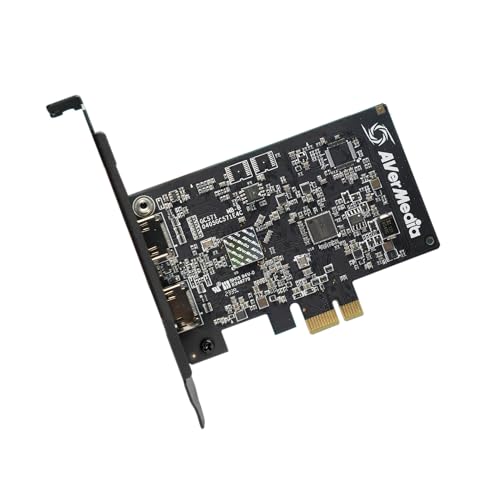
For streamers and gamers demanding high-quality visuals with minimal latency, the AVerMedia HDMI Capture Card stands out thanks to its support for HDMI 2.0 input sources and 4K60 pass-through. It delivers 4K30 capture resolution for sharp streams and 1080p120FPS for smooth gameplay. Features like VRR support ensure tear-free, responsive gaming, while the ultra-low latency pass-through keeps gameplay real-time across consoles like PS5, Xbox Series X/S, and Switch. With plug-and-play PCIe installation and broad compatibility, this card is versatile for various setups. It’s ideal for capturing, streaming, or recording high-quality gameplay with minimal fuss and maximum performance.
Best For: streamers and gamers seeking high-quality, low-latency gameplay and streaming capabilities across multiple consoles and PC setups.
Pros:
- Supports HDMI 2.0 input with 4K60 pass-through for immersive, real-time gameplay.
- Offers 4K30 capture resolution and 1080p120FPS for sharp and smooth streaming.
- Plug-and-play PCIe installation with broad compatibility across various hardware configurations.
Cons:
- May require a compatible PCIe slot and sufficient system resources for optimal performance.
- No built-in streaming or editing software; users need additional tools.
- Potentially higher cost compared to entry-level capture cards with fewer features.
Aluminum HDMI Capture Card for Streaming and Gaming

The Aluminum HDMI Capture Card stands out as an excellent choice for streamers and content creators who demand durability and reliable performance. Its support for HDMI input and pass-through resolution up to 4K@60Hz ensures sharp visuals, with a maximum streaming resolution of 1080p@60fps. Built with an aluminum-alloy shell, it offers excellent heat dissipation and durability for extended use. The ultra-low latency performance guarantees smooth gameplay and streaming without lag. Compatible with Windows, Mac, Linux, iOS, and Android, it works seamlessly with popular software like OBS and VLC. With easy plug-and-play setup and included accessories, it’s a versatile, reliable option for high-quality streaming and recording.
Best For: streamers, gamers, and content creators seeking a durable, high-quality HDMI capture solution for seamless live streaming and recording.
Pros:
- Supports 4K@60Hz HDMI pass-through for crisp visuals and high-quality output
- Aluminum-alloy shell provides excellent heat dissipation and durability for extended use
- Compatible with multiple operating systems and streaming software for versatile setup
Cons:
- Maximum streaming resolution is limited to 1080p@60fps, despite 4K pass-through support
- May require additional accessories for optimal use with certain devices or setups
- Plug-and-play setup might still face compatibility issues with some older or less common software
Factors to Consider When Choosing 4K60 Streaming Capture Cards
When selecting a 4K60 streaming capture card, I focus on how well it works with my devices and the quality of the video it delivers. I also consider latency, ease of setup, and the software features that can enhance my streaming experience. Understanding these factors helps me choose the right card for smooth, high-quality broadcasts.
Compatibility With Devices
Choosing a compatible 4K60 streaming capture card starts with guaranteeing it works seamlessly with your specific devices. You need to verify that the card supports your gaming console, like PlayStation, Xbox, Switch, or PC, to guarantee smooth operation. It’s also essential to check the input and output connections, such as HDMI 2.1, USB-C, or PCIe, so they match your existing setup without needing adapters. Compatibility with your operating system—Windows, macOS, or Linux—is vital for stable software performance. Additionally, confirm that the card can handle your desired resolution and frame rates, like 4K60 HDR, to meet your streaming quality standards. Finally, review compatibility with your streaming platforms and editing software to guarantee a hassle-free workflow and efficient content management.
Video Quality and Resolution
Video quality and resolution are key factors that determine how well your capture card can deliver sharp, vibrant streams. A good 4K60 capture card supports recording and streaming at 4K resolution with 60 frames per second, ensuring smooth motion and high clarity. Many models also support high dynamic range (HDR), which boosts color accuracy and contrast, making your content visually stunning. The quality of HDMI input and output, especially support for HDMI 2.0 or HDMI 2.1, is essential for handling 4K60 signals without compression or lag. Higher bitrates and advanced color depth options like 10-bit HDR contribute to richer visuals. Ensuring your capture card matches your device’s resolution and frame rate needs is vital for maximum performance and professional-looking streams.
Latency and Performance
To deliver smooth, real-time gameplay and streaming, minimizing latency is essential. Low latency capture cards typically respond in under 100 milliseconds, ensuring there’s no noticeable delay that could disrupt gameplay or viewer experience. The hardware performance of your system, especially GPU and CPU, plays a significant role in processing 4K60 streams smoothly with minimal lag. Features like HDMI 2.1 support and VRR help reduce input lag and prevent screen tearing, further enhancing performance. High-quality capture cards use efficient data compression and fast transfer protocols such as USB 3.0 or PCIe, which maintain low latency without sacrificing resolution. For competitive gaming and professional streaming, low latency isn’t just a convenience—it’s a critical factor that directly impacts reaction times and viewer engagement.
Connectivity and Setup Ease
When selecting a 4K60 streaming capture card, ensuring easy connectivity and setup is essential for a smooth experience. I look for devices that support USB-C or HDMI 2.1 connections, as these offer high-speed, reliable data transfer with minimal latency. A plug-and-play setup without the need for driver installation simplifies the process and saves time. Compatibility with my existing hardware, whether PCIe slots for internal cards or USB ports for external options, is also vital. I verify that the capture card works seamlessly with my operating system—Windows, macOS, or Linux—to avoid compatibility issues. Features like HDMI passthrough and straightforward cable management help me set up quickly and keep my workspace organized, making the entire process hassle-free.
Software and Features
Choosing a capture card with robust software and features can considerably elevate your streaming quality. Look for models that offer customizable settings for resolution, frame rate, and color correction to fine-tune your stream’s visuals. Support for HDR, VRR, and low latency pass-through is essential for smooth gameplay and vibrant visuals. Compatibility with popular broadcasting software like OBS, Streamlabs, or XSplit ensures seamless integration and easier setup. Additionally, check if the software provides audio mixing, commentary options, and multi-camera switching to give your streams a professional touch. Regular firmware and software updates are vital for accessing new features, security patches, and improved stability. Prioritizing these software features guarantees a more flexible, high-quality, and reliable streaming experience.
Frequently Asked Questions
What Software Compatibility Issues Might Arise With These Capture Cards?
I’ve noticed some software compatibility issues can pop up with these capture cards. Sometimes, they don’t work smoothly with certain streaming or editing programs like OBS or Streamlabs, causing delays or dropped frames. Additionally, drivers may not always update promptly, leading to conflicts or crashes. To avoid headaches, I recommend checking the card’s compatibility with your preferred software before buying and keeping drivers up to date.
How Do Latency Differences Impact Live Streaming Quality?
Latency is like the ripple effect when you toss a stone—tiny delays can cause noticeable disruptions. When streaming, even a small latency difference can make your gameplay feel out of sync, causing lag or stutter. I once experienced this during a tournament; the delay between my game and the stream was frustrating. Reducing latency guarantees your viewers get a smooth, real-time experience, making your stream more professional and engaging.
Are There Specific System Requirements for 4K60 Capture Cards?
Yes, there are specific system requirements for 4K60 capture cards. I recommend a powerful CPU like an Intel i7 or AMD Ryzen 7, at least 16GB of RAM, and a high-end GPU such as an NVIDIA RTX 30 series or AMD RX 6000 series. Your PC also needs a fast USB 3.0 or PCIe slot, depending on the card. Adequate storage and a reliable internet connection are essential for smooth streaming.
Can These Capture Cards Be Used for Both PC and Console Gaming?
Absolutely, these capture cards are versatile tools that can handle both PC and console gaming like a dependable Swiss Army knife. I’ve used mine for Xbox, PlayStation, and PC setups, and they perform flawlessly across all platforms. Just make sure your device’s specifications meet the requirements, and you’ll be set for seamless, high-quality streaming and recording. They’re like a bridge that unites all your gaming worlds effortlessly.
What Is the Average Lifespan and Durability of High-End Capture Cards?
High-end capture cards typically last around 3 to 5 years with proper care. I’ve found that their durability depends on usage frequency, handling, and environmental factors like dust or heat. To extend their lifespan, I make sure to keep them clean, avoid unplugging while active, and use surge protectors. If I treat them well, these cards continue delivering high-quality streams, making the investment worthwhile for long-term gaming and content creation.
Conclusion
Choosing the right 4K60 capture card can elevate your streaming and gaming experience. Did you know that over 60% of streamers report improved viewer engagement after upgrading to 4K-capable hardware? With so many great options out there, finding one that fits your setup is essential. Invest in quality, and you’ll enjoy seamless, high-quality content that keeps your audience hooked. Ready to level up your stream? It’s time to pick your perfect capture card!