A laptop feels fast in daily use when it has a powerful processor, ample RAM, and SSD storage, enabling smooth multitasking and quick load times. A high-quality display with sharp visuals and fast refresh rates makes interactions feel more responsive. Good battery health guarantees consistent performance without slowing down. When these elements work together, your device becomes more efficient and enjoyable to use. Keep exploring for more tips on boosting your laptop’s speed and responsiveness.
Key Takeaways
- Fast SSD storage reduces load times and enhances overall responsiveness.
- Powerful processors and ample RAM support smooth multitasking and quick application performance.
- High-quality display with high refresh rates and sharp visuals improve visual feedback and interaction speed.
- Maintaining good battery health ensures sustained high performance during extended use.
- Hardware synergy and optimization enable seamless operation and a more responsive user experience.

When using your laptop daily, speed can greatly impact your productivity and overall experience. A fast laptop lets you switch between tasks smoothly, run applications without lag, and complete your work efficiently. Several factors contribute to that quick, responsive feeling, and two of the most noticeable are battery life and display quality. While these might seem unrelated to speed at first glance, they influence your perception of overall performance and usability.
Good battery life ensures your laptop remains responsive during long work sessions without needing frequent recharges. When your device has a solid battery, you’re less likely to experience slowdowns caused by power management limitations. Many laptops throttle performance to conserve energy, especially when the battery is running low, which can make your machine feel sluggish. A reliable battery allows the system to operate at optimal speeds, so you can work uninterrupted. Plus, when your battery lasts longer, you won’t feel pressured to close apps or limit your activities, which helps maintain a sense of speed and fluidity in daily use. Maintaining battery health is essential for consistent performance over time.
A reliable battery keeps your laptop fast and responsive during long work sessions without interruptions.
Display quality also plays a vital role in how fast your laptop feels. A high-resolution screen with sharp, vivid visuals provides quicker visual feedback, making interactions seem more responsive. When your display is clear and vibrant, scrolling through documents or browsing the web feels smoother because your eyes can process content more easily. Additionally, a display with fast refresh rates reduces motion blur during scrolling or animations, giving you a more immediate and fluid experience. When you combine a high-quality display with quick hardware, your perception of speed increases, making everything from opening apps to navigating through files feel instant. Improving hardware synergy — the way components work together — can further boost your device’s responsiveness and longevity.
Furthermore, paying attention to traditional Indonesian home decor principles such as the use of natural materials and balanced aesthetics can create a more harmonious environment that can positively influence your overall experience, including how you perceive your device’s performance. Beyond these factors, the hardware components inside your laptop matter just as much. An SSD (solid-state drive) drastically improves load times, while a powerful processor handles multitasking smoothly. When all these elements work together—fast storage, capable CPU, ample RAM—you get that seamless feeling of speed that turns your laptop into a powerful tool for daily use. Performance optimization techniques can further enhance your device’s responsiveness and longevity.
In essence, maintaining good battery health, choosing a device with high display quality, and ensuring your hardware is up to date all contribute to a faster, more responsive laptop experience. When these elements are aligned, your daily tasks feel effortless, allowing you to focus on what matters without being slowed down by technical limitations.

Aiibe 256GB Internal Solid State Drive SATA III SSD 256GB 2.5” SSD Drive Internal Up to 550MB/s for Computer Laptop (Black)
Ultra Fast Transfer Speed: Using SATA 3.0 high-speed interface, the reading speed can reach 550MB/S, which is 4-5…
As an affiliate, we earn on qualifying purchases.
As an affiliate, we earn on qualifying purchases.
Frequently Asked Questions
How Does RAM Size Affect Daily Laptop Performance?
Larger RAM size boosts your laptop’s ability to handle multiple tasks smoothly, so your daily performance feels faster. With more RAM, your system manages graphics performance better, especially for demanding applications or multitasking, and you notice less lag. Plus, increased RAM can improve battery efficiency by reducing the need for your laptop to swap data with storage frequently, helping your device run longer without slowing down.
Can Software Optimization Improve Perceived Speed?
Yes, software optimization can improve perceived speed, especially when combined with hardware upgrades. You can streamline your user habits by closing unnecessary apps and clearing background processes, making your laptop feel faster. Additionally, updating drivers and optimizing startup programs enhances performance. These steps help your hardware reach its full potential, reducing lag and making everyday tasks smoother, so your laptop feels quicker and more responsive during daily use.
What Role Does Storage Type Play in Responsiveness?
Storage type plays a vital role in responsiveness, especially when using an SSD. SSDs offer faster read/write speeds, making your laptop feel snappier during daily tasks. While SSD longevity guarantees durability, it’s necessary to balance storage capacity with your needs. A larger SSD provides more space for files and applications, maintaining speed without compromising storage. Overall, upgrading to an SSD considerably enhances responsiveness and keeps your laptop feeling fast in everyday use.
How Do Background Processes Impact Laptop Speed?
Did you know that background apps and system updates can slow down your laptop by up to 50%? They consume CPU, RAM, and disk resources without your awareness. When these processes run in the background, they compete with your active tasks, causing lag and sluggishness. To keep your laptop feeling fast, regularly close unnecessary background apps and schedule system updates during times you’re not using your device.
Does Screen Resolution Influence Perceived Performance?
Yes, screen resolution influences perceived performance because higher resolution enhances display clarity and visual sharpness. When your display has a sharp, clear image, tasks seem more responsive and smooth, making everything feel faster. Conversely, lower resolution can make visuals look blurry or less detailed, which might cause you to perceive slower performance. Choosing a higher resolution display often improves your overall experience, especially during multitasking or detailed work.

HP New Core i7 15.6" Laptop | 2026 Edition | Intel High-Performance Core i7-1255U up to 4.7GHz | 16GB RAM – 512GB PCIe SSD | Webcam | FHD | Long Battery Life | Windows 11 | Business & Academic
【12th Gen Intel Powerhouse】 Equipped with the 10-core Intel Core i7-1255U processor (up to 4.7GHz with Turbo Boost…
As an affiliate, we earn on qualifying purchases.
As an affiliate, we earn on qualifying purchases.
Conclusion
A fast laptop isn’t just about specs; it’s like a trusted steed that responds instantly to your commands. When your device moves seamlessly, it becomes a symbol of your efficiency and confidence, like a well-tuned engine propelling you forward. Remember, a swift laptop is your partner in steering through daily tasks with ease, turning simple moments into smooth journeys. Embrace the speed, and let your device be the steady compass guiding you through every day’s adventure.
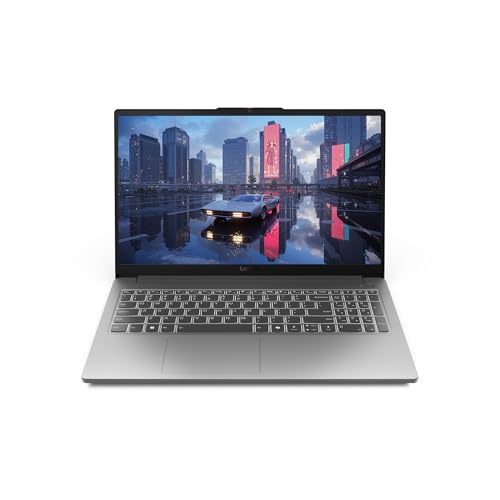
Lenovo LOQ Essential – AI-Powered Student Gaming Laptop – Intel® Core™i5-12450HX – 15.6" FHD IPS Display – 144Hz Refresh Rate – NVIDIA® GeForce RTX™ 4050 – 8GB Memory – 512GB SSD Storage – Luna Grey
JOIN THE GAME – The Lenovo LOQ Essential will never let you down on the battlefield or in…
As an affiliate, we earn on qualifying purchases.
As an affiliate, we earn on qualifying purchases.

BLUEING 15.6" Laptop Computer, Laptop with 16GB RAM 512B SSD, Gold 6500Y (Up to 3.4GHz), 1080P FHD IPS Display, Type-C, HDMI, USB3.2, WIFI, Bluetooth, Long Battery Life, Laptops for Business & Student
SMOOTH PERFORMANCE – The Laptop Featuring Pentium Gold 6500Y Processor that can boost up to 3.4 GHz with…
As an affiliate, we earn on qualifying purchases.
As an affiliate, we earn on qualifying purchases.