

To develop tech habits that work, focus on managing your screen time, using digital tools like Notion or Evernote to organize notes, and reviewing them regularly. Set specific times for device use and take breaks to stay balanced. Practice mindful engagement by avoiding distractions and prioritizing tasks. Staying organized and aware of your digital habits helps improve focus and productivity. Keep exploring ways to optimize your tech use—you’ll find even more helpful tips ahead.
Key Takeaways
- Establish dedicated tech-free times to reduce digital overwhelm and promote balance.
- Use digital note-taking apps like OneNote or Notion for organized, searchable study materials.
- Categorize and tag notes regularly to improve retrieval and review efficiency.
- Track and analyze your screen time to identify habits and set boundaries for healthier device use.
- Incorporate multimedia elements into notes to enhance understanding and engagement.

In today’s digital age, developing healthy tech habits is essential for students to stay focused, productive, and balanced. One effective way to do this is by mastering digital note taking. Instead of relying solely on paper, you can use apps and tools designed to streamline your note-taking process. Digital notes are easy to organize, search, and share, making studying more efficient. When you use tools like OneNote, Evernote, or Notion, you can quickly categorize your notes by subjects, add multimedia elements, and access them from any device. This flexibility keeps you from feeling overwhelmed by paper clutter and helps you stay on top of assignments and ideas. To maximize your digital note-taking, develop a habit of summarizing information instead of copying verbatim. This active engagement enhances understanding and retention. Also, consider setting aside specific times to review and update your notes, which reinforces learning. Incorporating organized storage solutions can further improve your ability to retrieve and manage your notes effectively. Managing your screen time effectively also involves being mindful of how much time you spend on your devices overall. Track your usage for a few days to identify patterns and adjust accordingly. Remember, it’s not about eliminating screen time but ensuring it supports your academic goals and personal well-being.

Yuan Smart Digital Notebook with Pen, Smart Pen for Note Taking Real-Time Sync-to-Digital, Smart Writing for Meeting Class Creation, Digitizing, Store, and Share Handwritten Notes via App(iOS/Android)
【Important Note】 Before using the YUAN Smart Pen for the first time, fully charge it via USB. The…
As an affiliate, we earn on qualifying purchases.
As an affiliate, we earn on qualifying purchases.
Frequently Asked Questions
How Can Students Reduce Digital Distraction During Study Sessions?
To reduce digital distraction during study sessions, practice mindful technology by turning off notifications and limiting app usage. Use focus strategies like setting specific goals and timers to stay on track. Keep your phone away or in another room to minimize temptation. Regularly check in with yourself to stay aware of your focus. These habits help you concentrate better and make your study time more productive.
What Are the Best Apps for Managing Homework Deadlines?
You should try homework planners like Todoist or MyHomework, which help you organize tasks and set clear deadlines. These apps send timely deadline alerts, so you stay on track without last-minute stress. By using these tools, you keep your assignments organized and guarantee nothing slips through the cracks. Incorporate these apps into your routine, and you’ll manage your homework deadlines more efficiently and confidently.
How Can Students Improve Their Digital Organization Skills?
Think of your digital organization skills as a well-tuned orchestra. To improve, you should master digital note taking, making notes clear and easy to find, and develop efficient file management habits by creating organized folders and naming files consistently. Regularly review and declutter your digital space, and use tools like cloud storage to keep everything accessible. These steps will help your digital symphony stay harmonious and on beat.
What Are Effective Ways to Protect Student Privacy Online?
To protect your privacy online, you should use strong privacy safeguards like unique passwords and two-factor authentication. Always enable data encryption on your devices and in your online accounts to keep your information secure. Be cautious about sharing personal details on social media, and regularly review your privacy settings. Staying informed about privacy policies helps you understand how your data is used and guarantees you maintain control over your digital footprint.
How Can Students Balance Screen Time With Offline Activities?
You can easily master the art of balancing screen time by scheduling epic digital detox breaks and prioritizing outdoor engagement. Imagine unplugging for just an hour daily—your mind will thank you! Set timers, switch off devices, and get outside to enjoy fresh air and real-world connections. This way, you prevent tech overload, boost focus, and make room for offline adventures, turning balance into your new superpower.

Chore Chart with Screen Time Tracker Shipped, Earn Screen Time for Chore Completion. Order with Movable or Dry Erase Chores
11 inch by 8.5 inch screen time tracker. Order with your choice of dry erase chore spaces or…
As an affiliate, we earn on qualifying purchases.
As an affiliate, we earn on qualifying purchases.
Conclusion
Embracing good tech habits is like tending a garden—you nurture your skills, weed out distractions, and watch your potential bloom. Every mindful click and focused session is a seed planted for future success. When you stay disciplined, your devices become tools guiding you toward your goals, not barriers holding you back. Keep cultivating these habits, and you’ll find that your digital journey blossoms into a landscape of endless possibilities.
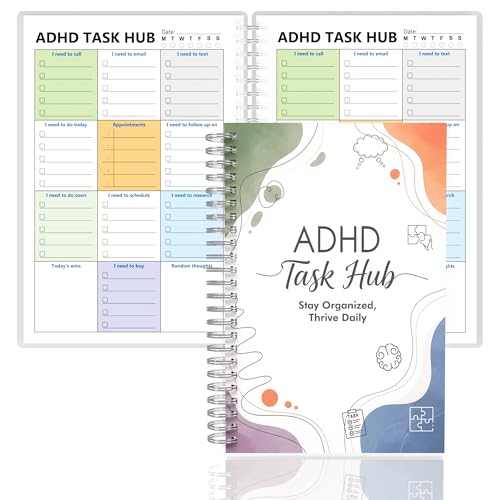
ADHD Planner for Focus & Productivity: Task Management Hub with Color-Coded Sections for Calls, Emails, To-Dos, Appointments & More. Reduce Overwhelm. A5, Durable Cover, 100gsm Paper, Spiral Bound
✅ SCIENTIFICALLY STRUCTURED FOR ADHD – Designed specifically to combat ADHD-related challenges, our "ADHD Task Hub" uses color-coded…
As an affiliate, we earn on qualifying purchases.
As an affiliate, we earn on qualifying purchases.

17 in 1 Black Desk Organizers and Accessories Set, 3 Office Desk Supplies Storage Organization, 4 Pens, Stapler, Staples & Remover, Tape & Dispenser, Scissors, Ruler, Clips, Hole Punch, Back to School
MULTIFUNCTIONAL DESK ORGANISER SET: Included in the set are 3 different organisers to keep your pens, notes and…
As an affiliate, we earn on qualifying purchases.
As an affiliate, we earn on qualifying purchases.