To create an effective remote work setup, focus on ergonomics with adjustable chairs, sit-stand desks, and ergonomic keyboards to stay comfortable. Make certain a reliable high-speed internet connection to prevent disruptions, and organize your space with shelves, cable organizers, and quality lighting. Establish a dedicated workspace to boost focus and create boundaries between work and personal life. Investing in these essentials helps you work efficiently and comfortably—keep exploring to discover how to optimize your environment further.
Key Takeaways
- Invest in ergonomic accessories like adjustable chairs and supportive keyboards to promote comfort and prevent strain.
- Ensure a reliable high-speed internet connection to facilitate seamless communication and quick access to online resources.
- Organize your workspace with storage solutions and good lighting to maintain focus and reduce distractions.
- Create a dedicated workspace to establish boundaries and improve focus during work hours.
- Optimize your environment with a combination of ergonomic tools, organized space, and proper lighting to boost productivity and well-being.
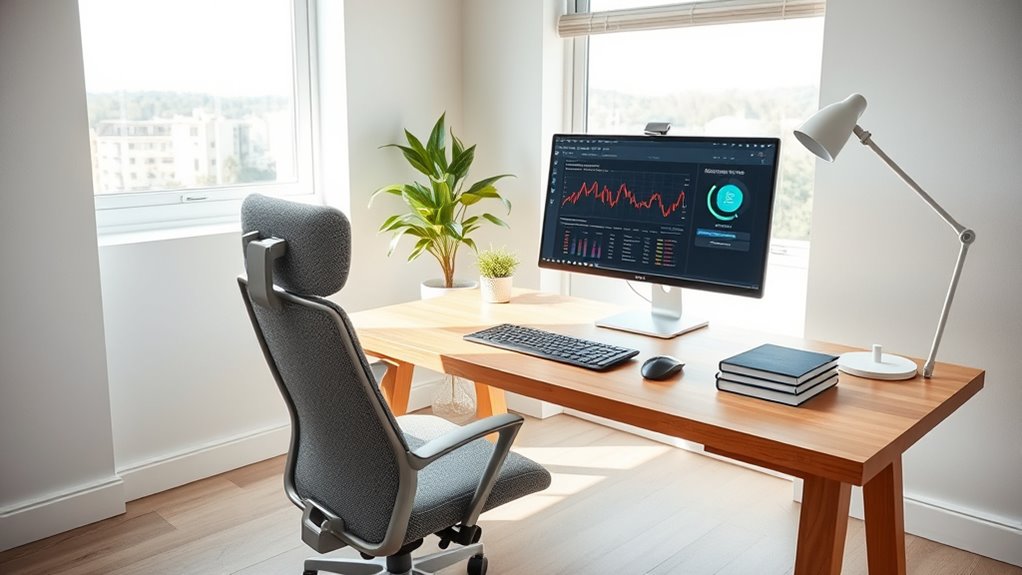
Are you equipped with the right tools to make remote work productive and comfortable? It all starts with creating a workspace that supports your efficiency and well-being. Essential to this setup are ergonomic accessories, which help maintain good posture and reduce fatigue during long hours at your desk. Think of an adjustable chair that supports your lower back, a sit-stand desk converter to vary your position throughout the day, and ergonomic keyboards and mice that promote natural hand movement. These tools might seem small, but they can substantially decrease discomfort and prevent repetitive strain injuries, ultimately boosting your overall productivity. When your body feels good, it’s easier to stay focused and motivated.
Another critical aspect is having a reliable, high-speed internet connection. Nothing derails a workday faster than lagging video calls or interrupted file uploads. A high-speed internet connection ensures seamless communication with colleagues, smooth video conferencing, and quick access to cloud-based documents. It allows you to work efficiently without frustration or delays, giving you the confidence to handle multiple tasks simultaneously. If your current connection is inconsistent, consider upgrading your plan or investing in a Wi-Fi extender to eliminate dead zones. Consistent, fast internet also reduces the risk of missed deadlines and miscommunications, which are common pitfalls of remote work. Additionally, understanding the role of proper connectivity can help you optimize your setup for maximum efficiency.
Your workspace should also be organized with functional storage solutions to keep clutter at bay. A tidy environment helps you concentrate better and minimizes distractions. Use shelving, drawers, and cable organizers to keep everything in order. When your workspace is clean and well-organized, your mind stays clear, and you can focus on your tasks without wasting time searching for supplies or dealing with tangled cords. Additionally, good lighting is crucial; natural light is preferable, but if that’s limited, invest in a quality desk lamp that reduces eye strain. Proper lighting and organization contribute to a more inviting and efficient environment, making it easier to settle into work mode each day.
Finally, don’t forget the importance of a dedicated workspace. Establishing a specific area solely for work helps create a psychological boundary between your professional and personal life. This mental separation improves focus and signals to others in your household that you’re in work mode. Incorporate personal touches like plants or artwork to make the space inviting, but keep the essentials within reach to maintain productivity. By combining ergonomic accessories, a high-speed internet connection, organization, and a dedicated space, you set yourself up for a successful remote work experience. When your environment supports your needs, work becomes less of a chore and more of a fulfilling, balanced routine.

Ergonomic Office Chair with Footrest – Adjustable Lumbar Support & Headrest, 90-160° Reclining Mesh Back Computer Chair – Home Office/Gaming, 350lbs Capacity
This is more than a chair; it's a personalized comfort zone for work, rest, and play. We've meticulously…
As an affiliate, we earn on qualifying purchases.
As an affiliate, we earn on qualifying purchases.
Frequently Asked Questions
How Can I Ensure My Home Wi-Fi Is Secure for Work?
To keep your home Wi-Fi secure for work, start by changing your default password to a strong, unique one and enable network encryption, like WPA3. Regularly update your router’s firmware to patch security vulnerabilities. Use password protection for your Wi-Fi network, and avoid sharing your password. Consider setting up a separate network for work devices to prevent unauthorized access, ensuring your data stays safe and private.
What Ergonomic Accessories Improve Comfort During Long Remote Work Hours?
To improve comfort during long remote work hours, invest in ergonomic accessories like ergonomic chairs and adjustable desks. These tools support your posture, reduce strain, and boost productivity. An ergonomic chair offers lumbar support and customizable features, while an adjustable desk allows you to switch between sitting and standing. Together, they create a flexible workspace that keeps you comfortable, focused, and healthy throughout your workday.
How Do I Manage Distractions in a Home Environment?
To manage distractions in your home environment, focus on noise reduction by using headphones or soundproofing. Set clear boundaries with others to minimize interruptions. Practice effective time management by scheduling focused work periods and breaks, helping you stay on task. Keep your workspace organized to reduce visual clutter, which can also cause distractions. Consistently applying these strategies helps you maintain productivity and create a more focused remote work environment.
What Are the Best Ways to Organize My Remote Workspace?
To organize your remote workspace effectively, focus on desk organization by keeping only essential items within reach. Use storage solutions like shelves, drawers, or organizers to declutter your surface. Designate specific areas for different tasks, and regularly tidy up to maintain order. Label storage containers to easily find supplies, and incorporate cable management tools to keep cords neat. This setup boosts productivity and creates a clean, inviting work environment.
How Can I Optimize Video Call Setups for Professionalism?
You might notice that a good lighting setup instantly boosts your professionalism on video calls. To optimize your setup, guarantee your face is well-lit with natural or soft artificial light, avoiding harsh shadows. Keep your background professional—organized, clutter-free, and neutral if possible—to avoid distractions. Position your camera at eye level for better engagement, and test your setup before calls. These small adjustments can make a big difference in how you present yourself.

VIVO 32 inch Desk Converter, K Series, Height Adjustable Sit to Stand Riser, Dual Monitor and Laptop Workstation with Wide Keyboard Tray, Black, DESK-V000K
Create Instant Active Standing – VIVO’s desk riser provides on-demand standing throughout the day for the freedom to…
As an affiliate, we earn on qualifying purchases.
As an affiliate, we earn on qualifying purchases.
Conclusion
Remember, your remote workspace is your lighthouse amid the storm. As you equip it with the essentials, you’re steering your ship with confidence and clarity. The right tools become your guiding stars, leading you smoothly through busy days and quiet nights alike. When you create a balanced, organized space, you’re not just working—you’re building a sanctuary where focus and productivity shine brightly, illuminating your path to success in the vast sea of remote work.

Wireless Keyboard and Mouse Combo, 2.4G Full Size Wave Keys Ergonomic Keyboard with Wrist Rest and 3-Level DPI Adjustable Wireless Ergonomic Mouse for Windows, Mac OS Desktop/Laptop/PC(Black)
【Wave Ergonomic Wireless Keyboard and Mouse Combo】The wireless keyboard features a wave key and wrist rest design that…
As an affiliate, we earn on qualifying purchases.
As an affiliate, we earn on qualifying purchases.

TP-Link AC1200 WiFi Extender, 2023 Engadget Best Budget Pick, 1.2Gbps Signal Booster for Home, Dual Band 5GHz/2.4GHz, Covers Up to 1500 Sq.ft and 30 Devices,Support Onemesh, One Ethernet Port (RE315)
𝐒𝐭𝐫𝐨𝐧𝐠𝐞𝐫 𝐖𝐢-𝐅𝐢 𝐢𝐧 𝐄𝐯𝐞𝐫𝐲 𝐂𝐨𝐫𝐧𝐞𝐫 – Enjoy extended coverage with strong performance powered by Adaptive Path Selection and…
As an affiliate, we earn on qualifying purchases.
As an affiliate, we earn on qualifying purchases.